# Transportation Service

##### **Process purpose and use cases**  
This process is used to organize employee transportation along designated routes.

**Use cases:**

- Subscribing to a regular transportation service between the workplace and a specific destination

#### **How can I initiate the Transportation Service process in the DMS system?**

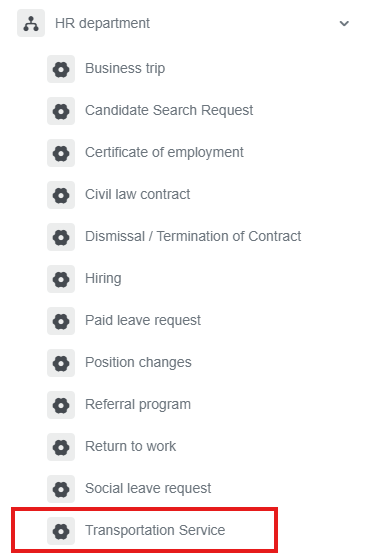
<div class="ql-block" data-block-id="block-e8426000-f9c7-40aa-ad3c-d1937d5c467c" id="bkmrk-1.-go-to%C2%A0bpm.sdu.edu">1. Go to [dms.sdu.edu.kz](http://bpm.sdu.edu.kz/), navigate to the "**Start Process**" section, and proceed to **HR Department ➝ Transportation Service** process**.**</div><div class="ql-block" data-block-id="block-e8426000-f9c7-40aa-ad3c-d1937d5c467c" id="bkmrk-"></div>[![image.png](https://wiki.sdu.edu.kz/uploads/images/gallery/2026-01/scaled-1680-/LGDimage.png)](https://wiki.sdu.edu.kz/uploads/images/gallery/2026-01/LGDimage.png)

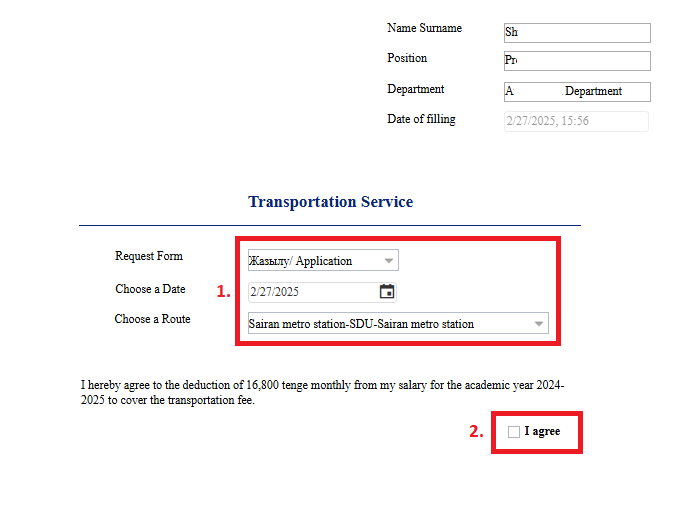
2\. 1) If you have selected the application form, fill in the fields.

2\) You need to give your consent in the form of an application to deduct the transportation service fee from your salary!

[![тут.27.02.25.3.PNG](https://wiki.sdu.edu.kz/uploads/images/gallery/2025-02/scaled-1680-/tut-27-02-25-3.PNG)](https://wiki.sdu.edu.kz/uploads/images/gallery/2025-02/tut-27-02-25-3.PNG)
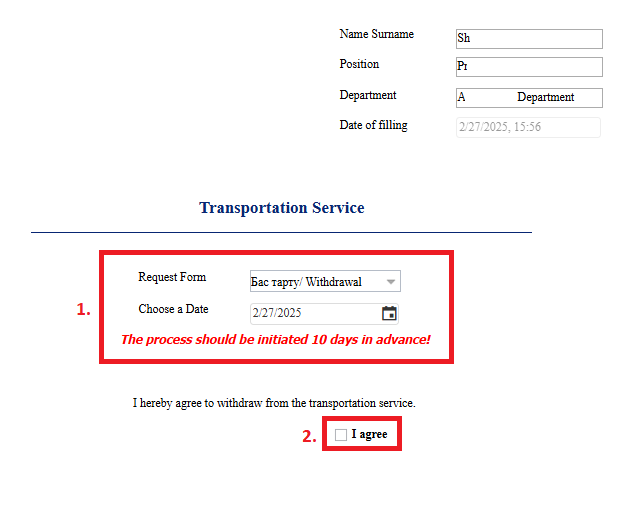
3\. 1) If you have selected the withdrawal form, choose the date.  
<span style="text-decoration: underline;"><span style="color: rgb(0, 0, 0); text-decoration: underline;">**Note!** The withdrawal form must be filled out 10 days in advance!</span></span>

2\) In the withdrawal form, the "I agree" button must be filled in mandatory!

[![тут.27.02.25.4.PNG](https://wiki.sdu.edu.kz/uploads/images/gallery/2025-02/scaled-1680-/tut-27-02-25-4.PNG)](https://wiki.sdu.edu.kz/uploads/images/gallery/2025-02/tut-27-02-25-4.PNG)
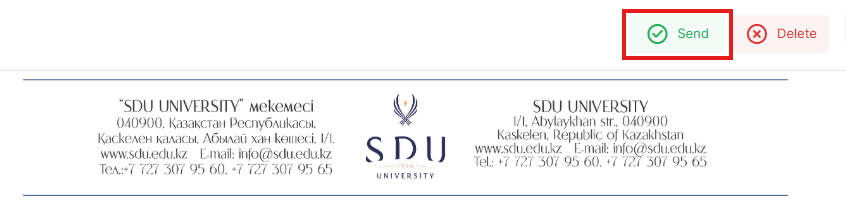
<div class="ql-block" data-block-id="block-5414642f-675c-4827-b3eb-cb77d1356059" id="bkmrk-4.-once-the-required">4. Once the required information is provided, click the "Send" button.</div><div class="ql-block" data-block-id="block-5e2b1e2f-aff1-43cc-8719-bffa6a309857" id="bkmrk--5">  
</div>[![image.png](https://wiki.sdu.edu.kz/uploads/images/gallery/2026-01/scaled-1680-/yKAimage.png)](https://wiki.sdu.edu.kz/uploads/images/gallery/2026-01/yKAimage.png)

<div class="ql-block" data-block-id="block-ddebc24f-49aa-493a-97bd-34b5382e7633" id="bkmrk--7">  
</div>##### **Process guidelines**

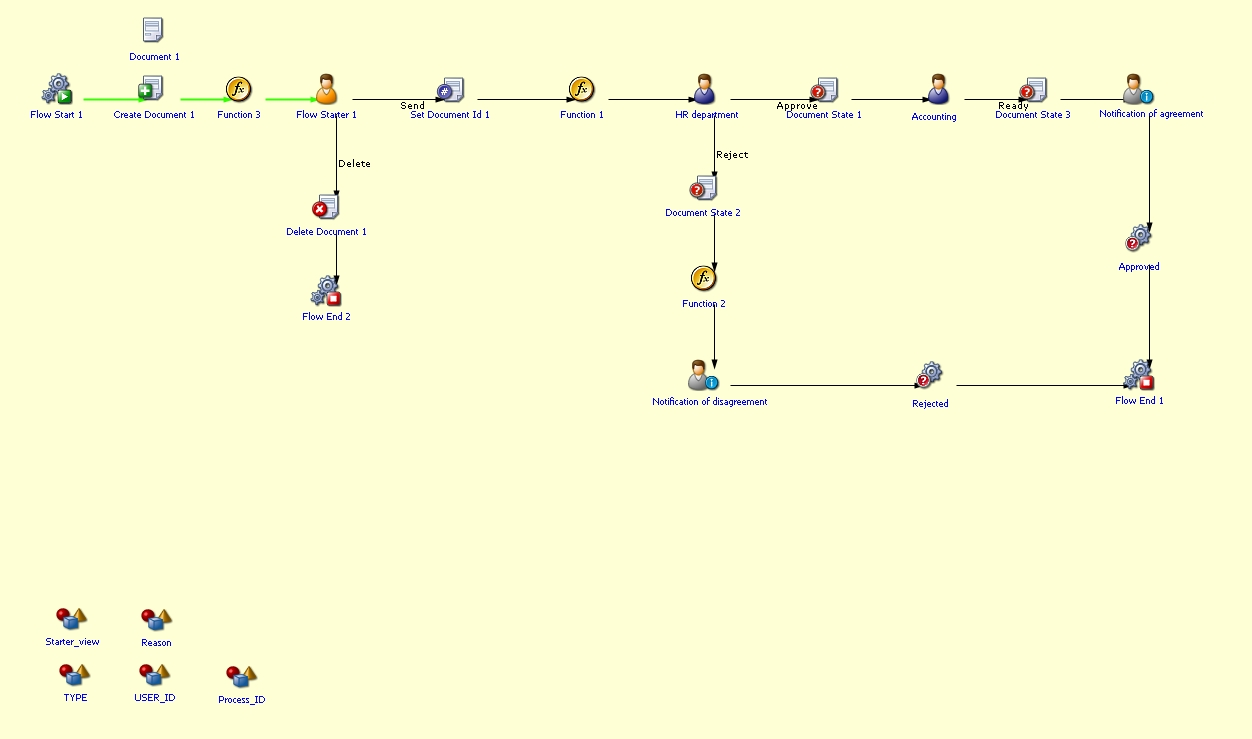
<div class="ql-block" data-block-id="block-55bc3974-de15-4612-b36b-d13fd159e569" id="bkmrk-you-can-view-the-pro">You can view the process workflow in the section below.</div><div class="ql-block" data-block-id="block-1ca7f645-f50c-453a-a915-b3332fa0cd77" id="bkmrk--8">  
</div>[![image.png](https://wiki.sdu.edu.kz/uploads/images/gallery/2025-02/scaled-1680-/pbTimage.png)](https://wiki.sdu.edu.kz/uploads/images/gallery/2025-02/pbTimage.png)

<div class="ql-block" data-block-id="block-07e04495-8fa6-4b62-bc70-1b2c02e6a959" id="bkmrk--10">  
</div><div class="ql-block" data-block-id="block-a4f8dc89-afb9-46a5-91dc-bd56f6d1143f" id="bkmrk--11">  
</div><div class="ql-block" data-block-id="block-48cc51f5-c706-44fd-9209-8fb49e4fa611" id="bkmrk-for-all-inquiries%2C-y">**For all inquiries, you can submit a request through [helpdesk.sdu.edu.kz](http://helpdesk.sdu.edu.kz/) ➝ "Submit a ticket" ➝ "BPM" or contact us via email at <dms@sdu.edu.kz>!**</div>