# Position changes

##### **Process purpose and use cases**  
This process is used to formalize and approve personnel changes within the organization. It applies in the following cases:

- Changes in an employee’s position (promotion, demotion, or transfer to another department)
- Changes in an employee’s working conditions (contract renewal, salary adjustment, etc.)
- Temporary or permanent appointment to another position
- Approval of personnel changes due to internal structural modifications

This process is implemented to efficiently manage HR processes, properly allocate workforce resources, and ensure timely updates of employee records.

#### **How can I initiate the Position changes process in the DMS system?**

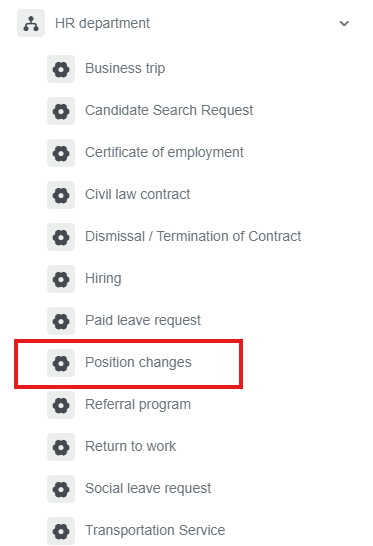
<div class="ql-block" data-block-id="block-e8426000-f9c7-40aa-ad3c-d1937d5c467c" id="bkmrk-1.-go-to%C2%A0bpm.sdu.edu">1. Go to [dms.sdu.edu.kz](http://bpm.sdu.edu.kz/), navigate to the "**Start Process**" section, and proceed to **HR Department ➝ Position changes** process**.**</div><div class="ql-block" data-block-id="block-e8426000-f9c7-40aa-ad3c-d1937d5c467c" id="bkmrk-"></div>[![image.png](https://wiki.sdu.edu.kz/uploads/images/gallery/2026-01/scaled-1680-/uElimage.png)](https://wiki.sdu.edu.kz/uploads/images/gallery/2026-01/uElimage.png)

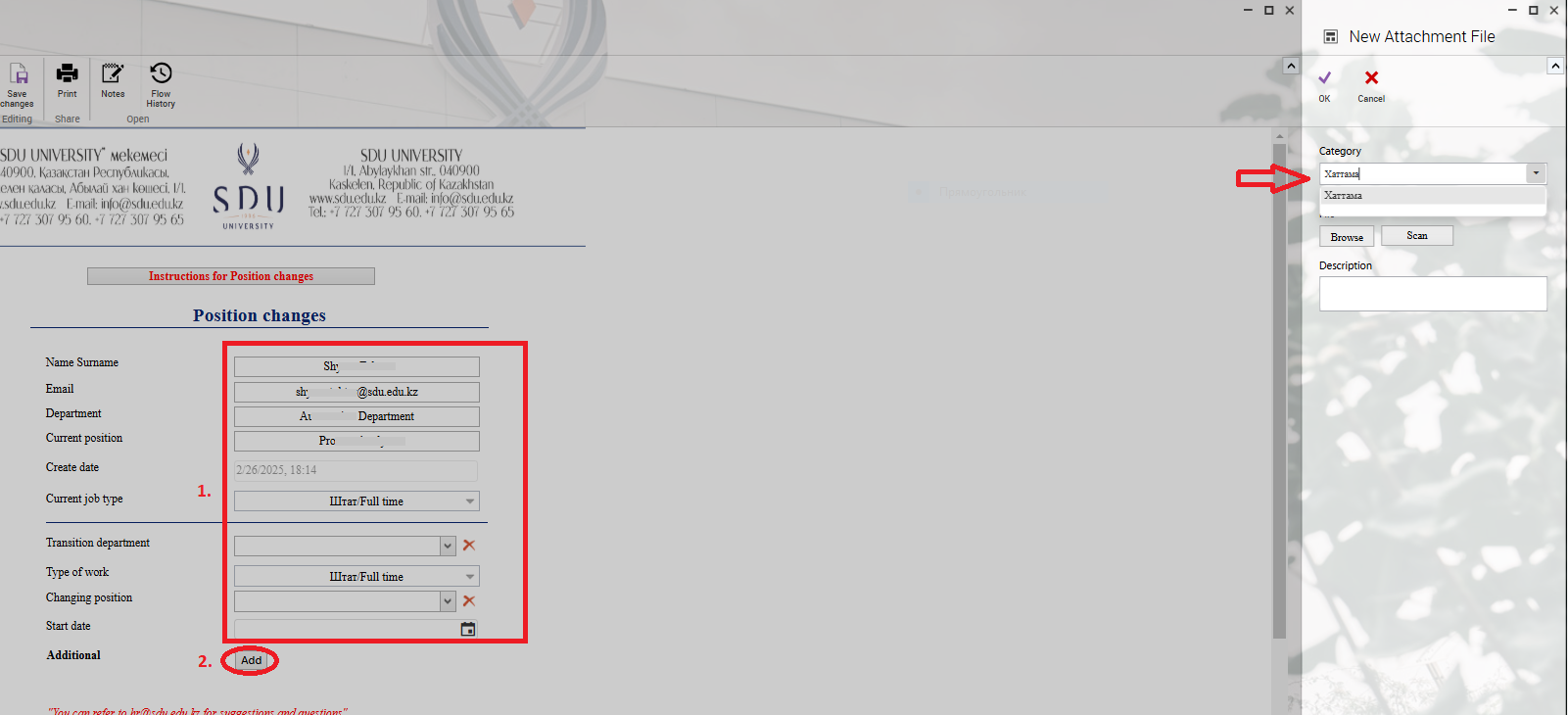
2\. 1) Fill out the form with information about your current and new position.

2\) When you click the "Add" button, a new window will open where you need to attach the protocol.

[![тут.26.02.25.10.PNG](https://wiki.sdu.edu.kz/uploads/images/gallery/2025-02/scaled-1680-/tut-26-02-25-10.PNG)](https://wiki.sdu.edu.kz/uploads/images/gallery/2025-02/tut-26-02-25-10.PNG)
<div class="ql-block" data-block-id="block-e8426000-f9c7-40aa-ad3c-d1937d5c467c" id="bkmrk--3"></div><div class="ql-block" data-block-id="block-e8426000-f9c7-40aa-ad3c-d1937d5c467c" id="bkmrk--4"></div><div class="ql-block" data-block-id="block-e8426000-f9c7-40aa-ad3c-d1937d5c467c" id="bkmrk--5"></div><div class="ql-block" data-block-id="block-e8426000-f9c7-40aa-ad3c-d1937d5c467c" id="bkmrk-3.-once-the-required"><div class="ql-block" data-block-id="block-5414642f-675c-4827-b3eb-cb77d1356059">3. Once the required information is provided, click the "Send" button.</div><div class="ql-block" data-block-id="block-5e2b1e2f-aff1-43cc-8719-bffa6a309857">  
</div></div>[![image.png](https://wiki.sdu.edu.kz/uploads/images/gallery/2026-01/scaled-1680-/MZPimage.png)](https://wiki.sdu.edu.kz/uploads/images/gallery/2026-01/MZPimage.png)

<div class="ql-block" data-block-id="block-e8426000-f9c7-40aa-ad3c-d1937d5c467c" id="bkmrk--7"><div class="ql-block" data-block-id="block-ddebc24f-49aa-493a-97bd-34b5382e7633">  
</div></div>##### **Process guidelines**

<div class="ql-block" data-block-id="block-e8426000-f9c7-40aa-ad3c-d1937d5c467c" id="bkmrk-you-can-view-the-pro"><div class="ql-block" data-block-id="block-55bc3974-de15-4612-b36b-d13fd159e569">You can view the process workflow in the section below.</div><div class="ql-block" data-block-id="block-1ca7f645-f50c-453a-a915-b3332fa0cd77">  
</div><div class="ql-block" data-block-id="block-b7ffc5ab-c658-4c32-a1f5-68ed2f97a294">  
</div></div>[![image.png](https://wiki.sdu.edu.kz/uploads/images/gallery/2025-02/scaled-1680-/H33image.png)](https://wiki.sdu.edu.kz/uploads/images/gallery/2025-02/H33image.png)

<div class="ql-block" data-block-id="block-e8426000-f9c7-40aa-ad3c-d1937d5c467c" id="bkmrk-for-all-inquiries%2C-y"><div class="ql-block" data-block-id="block-b7ffc5ab-c658-4c32-a1f5-68ed2f97a294">  
</div><div class="ql-block" data-block-id="block-07e04495-8fa6-4b62-bc70-1b2c02e6a959">  
</div><div class="ql-block" data-block-id="block-a4f8dc89-afb9-46a5-91dc-bd56f6d1143f">  
</div><div class="ql-block" data-block-id="block-48cc51f5-c706-44fd-9209-8fb49e4fa611">**For all inquiries, you can submit a request through [helpdesk.sdu.edu.kz](http://helpdesk.sdu.edu.kz/) ➝ "Submit a ticket" ➝ "BPM" or contact us via email at <dms@sdu.edu.kz>!**</div></div>