# Edit data

##### **Process purpose and use cases**  
This process is used for the official registration and approval of changes to SDU students' data when necessary.


#### **How can I initiate the Edit data process in the DMS system?**

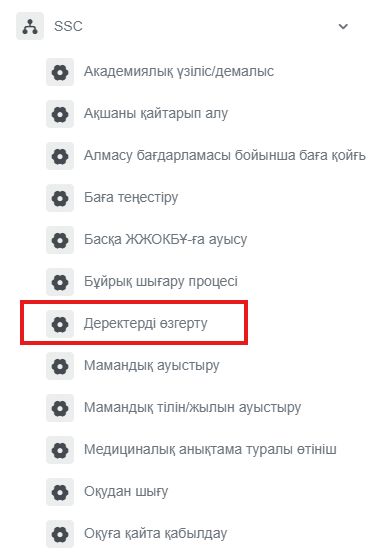
<div class="ql-block" data-block-id="block-e8426000-f9c7-40aa-ad3c-d1937d5c467c" id="bkmrk-1.-go-to%C2%A0bpm.sdu.edu">1. Go to [dms.sdu.edu.kz](http://bpm.sdu.edu.kz/), navigate to the "**Start Process**" section, and proceed to **SSC ➝ Деректерді өзгерту / Edit data** process**.**</div><div class="ql-block" data-block-id="block-e8426000-f9c7-40aa-ad3c-d1937d5c467c" id="bkmrk-note%3A-ssc-processes-">****Note:** SSC processes can only be initiated by SSC employees.**</div><div class="ql-block" data-block-id="block-e8426000-f9c7-40aa-ad3c-d1937d5c467c" id="bkmrk-"></div>[![image.png](https://wiki.sdu.edu.kz/uploads/images/gallery/2026-01/scaled-1680-/dcfimage.png)](https://wiki.sdu.edu.kz/uploads/images/gallery/2026-01/dcfimage.png)

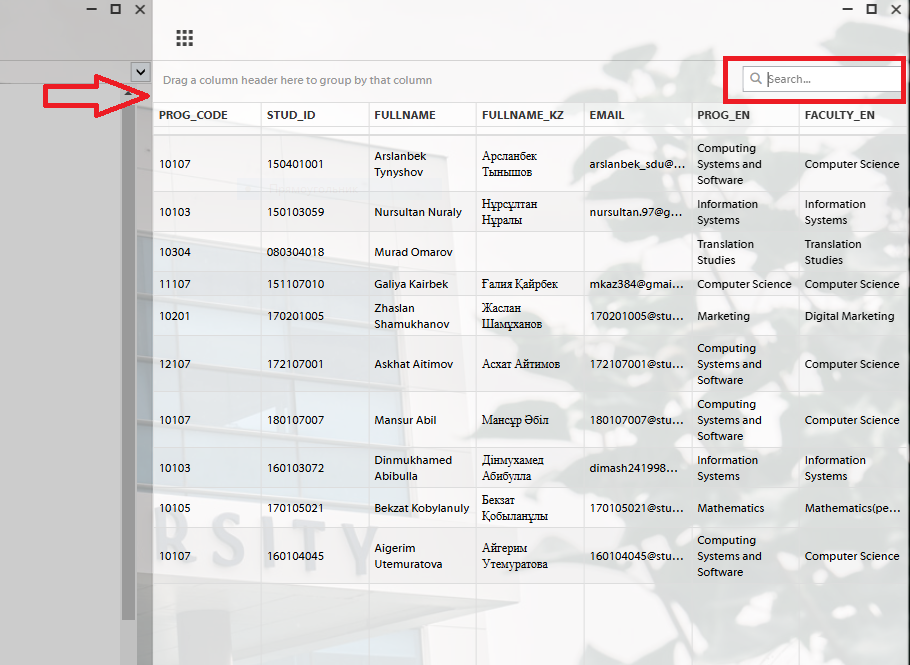
2\. To select a student, click the button in the "**Студент ID / Student ID**" field.

[![image.png](https://wiki.sdu.edu.kz/uploads/images/gallery/2025-03/scaled-1680-/hgiimage.png)](https://wiki.sdu.edu.kz/uploads/images/gallery/2025-03/hgiimage.png)
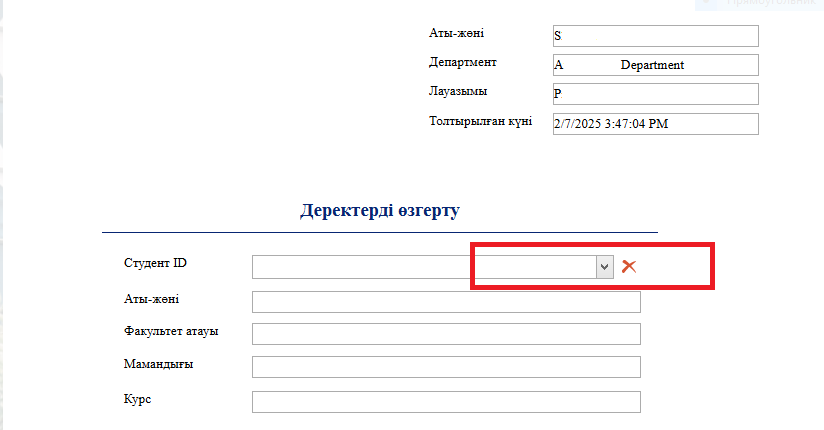
3\. After clicking the button, a new window will appear. Enter the student's **ID** number in that window. Once the **ID** is entered, all fields will be filled in automatically.

[![image.png](https://wiki.sdu.edu.kz/uploads/images/gallery/2025-03/scaled-1680-/PySimage.png)](https://wiki.sdu.edu.kz/uploads/images/gallery/2025-03/PySimage.png)
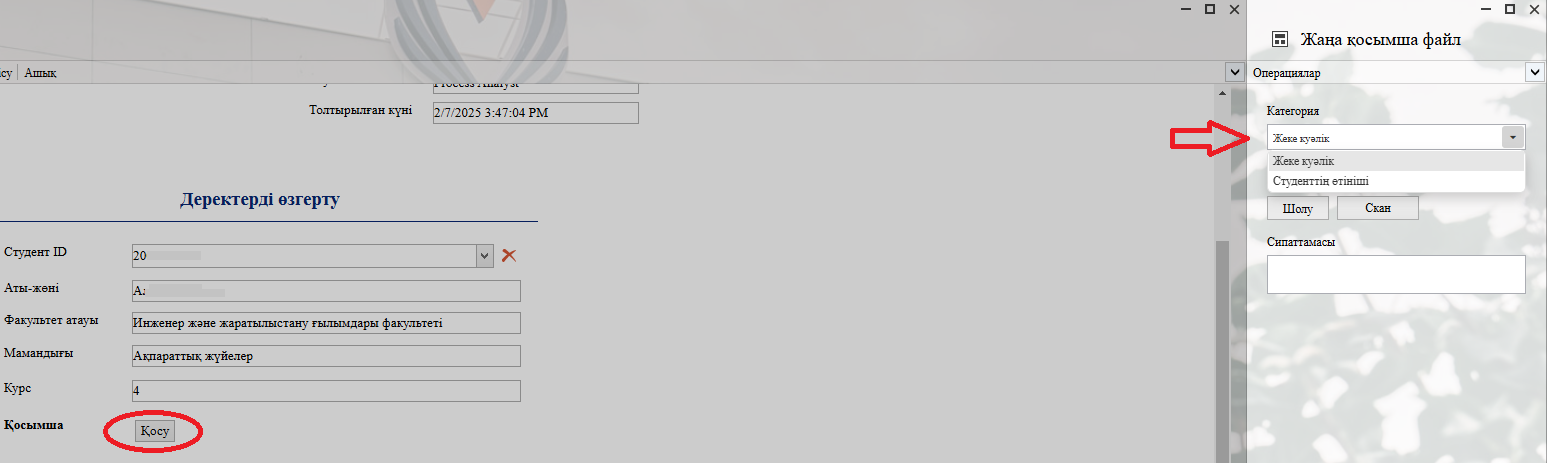
<div class="ql-block" data-block-id="block-dd8cfb6f-351c-4ac7-9518-f0faa4877d22" id="bkmrk-4.-when-you-click-th">*4.* When you click the "Қосу" — "Add" button, you can attach the required file to the categories on the left in the opened window.</div><div class="ql-block" data-block-id="block-ea0ce2b5-4801-4f39-b24a-d098dee48d11" id="bkmrk--8">  
</div><div class="ql-block" data-block-id="block-776d6793-5cc0-4fd4-9574-d98b28169efd" id="bkmrk--9">![](https://t3751943.p.clickup-attachments.com/t3751943/00c2d678-60d2-429b-9df1-0529852c184a/%D1%82%D1%83%D1%82.07.02.25.4.PNG)</div><div class="ql-block" data-block-id="block-e31cef8d-cb17-4b05-948c-3f17d6c01738" id="bkmrk--10">  
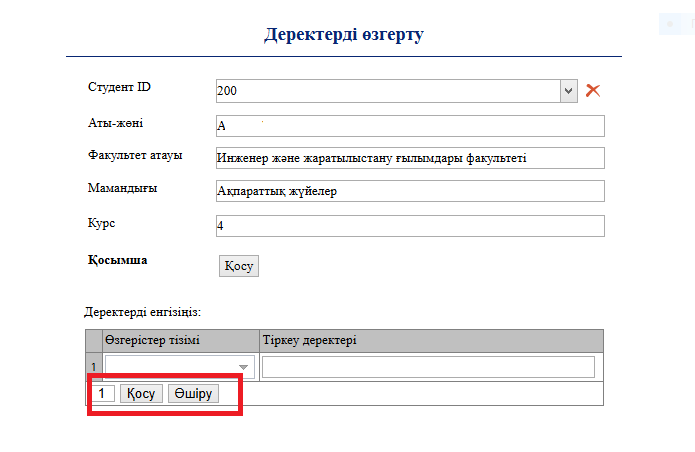
</div><div class="ql-block" data-block-id="block-febd48ca-1b56-47ff-9cd4-8b2c3447cd65" id="bkmrk-5.-in-the-first-row-">*5.* In the first row of the table ("Өзгерістер тізімі / List of changes"), you can select the categories that can be modified. In the second row ("Тіркеу деректері / Registration data"), enter the updated value of the selected information.</div>[![image.png](https://wiki.sdu.edu.kz/uploads/images/gallery/2025-03/scaled-1680-/e4Oimage.png)](https://wiki.sdu.edu.kz/uploads/images/gallery/2025-03/e4Oimage.png)

<div class="ql-block" data-block-id="block-febd48ca-1b56-47ff-9cd4-8b2c3447cd65" id="bkmrk--12"></div><div class="ql-block" data-block-id="block-a0490a86-029c-4f80-b05a-833eaf04ea68" id="bkmrk-6.-once-the-required"><div class="ql-block" data-block-id="block-8b49b1e0-321b-4b21-8d58-ec5ff0c0e138" id="bkmrk-3.-once-the-required-1">6. Once the required information is provided, click the "**Жіберу / Send** " button.</div><div class="ql-block" data-block-id="block-6a16f183-cb32-456b-b574-b26170f686ba" id="bkmrk--13">  
</div><div class="ql-block" data-block-id="block-7421a09c-3502-4359-8783-3170b753a395">  
</div></div>[![image.png](https://wiki.sdu.edu.kz/uploads/images/gallery/2026-01/scaled-1680-/Hhsimage.png)](https://wiki.sdu.edu.kz/uploads/images/gallery/2026-01/Hhsimage.png)

<div class="ql-block" data-block-id="block-a0490a86-029c-4f80-b05a-833eaf04ea68" id="bkmrk-3.-once-the-required"><div class="ql-block" data-block-id="block-7421a09c-3502-4359-8783-3170b753a395" id="bkmrk--15"></div><div class="ql-block" data-block-id="block-c32d595a-6067-41dc-862c-9e02cf8b99ef" id="bkmrk--16">  
</div></div>##### **Process guidelines**

<div class="ql-block" data-block-id="block-a0490a86-029c-4f80-b05a-833eaf04ea68" id="bkmrk-you-can-view-the-pro"><div class="ql-block" data-block-id="block-6071006a-ca2e-4863-841e-a68789b79f6c" id="bkmrk-you-can-view-the-pro-1"><div class="ql-block" data-block-id="block-55bc3974-de15-4612-b36b-d13fd159e569">You can view the process workflow in the section below.</div>  
</div><div class="ql-block" data-block-id="block-a1722618-08ab-41f5-bb02-86004e5e5ed8">  
</div></div>[![image.png](https://wiki.sdu.edu.kz/uploads/images/gallery/2025-03/scaled-1680-/pYoimage.png)](https://wiki.sdu.edu.kz/uploads/images/gallery/2025-03/pYoimage.png)

<div class="ql-block" data-block-id="block-a0490a86-029c-4f80-b05a-833eaf04ea68" id="bkmrk--19"><div class="ql-block" data-block-id="block-a1722618-08ab-41f5-bb02-86004e5e5ed8">  
</div></div><div class="ql-block" data-block-id="block-a0490a86-029c-4f80-b05a-833eaf04ea68" id="bkmrk--21"></div><div class="ql-block" data-block-id="block-a0490a86-029c-4f80-b05a-833eaf04ea68" id="bkmrk--22"><div class="ql-block" data-block-id="block-a1722618-08ab-41f5-bb02-86004e5e5ed8" id="bkmrk--23"></div></div><div class="ql-block" data-block-id="block-a0490a86-029c-4f80-b05a-833eaf04ea68" id="bkmrk-for-all-inquiries%2C-y"><div class="ql-block" data-block-id="block-0b441e49-6a5f-46ab-a720-3b27e8f41fd3" id="bkmrk--24"></div><div class="ql-block" data-block-id="block-f7879764-1010-437e-925a-3534f329dcc6" id="bkmrk--25">  
</div><div class="ql-block" data-block-id="block-08077b0f-05c1-4ee9-a375-34a8b3883db4" id="bkmrk--26">  
</div><div class="ql-block" data-block-id="block-97760c0a-650c-4f9a-bbb2-de853618cc2c" id="bkmrk-for-all-inquiries%2C-y-1">**For all inquiries, you can submit a request through [helpdesk.sdu.edu.kz](http://helpdesk.sdu.edu.kz/) ➝ "Submit a ticket" ➝ "BPM" or contact us via email at <dms@sdu.edu.kz>!**</div><div class="mb-2 flex gap-3 empty:hidden -ml-2" id="bkmrk--27"><div class="items-center justify-start rounded-xl p-1 flex"><div class="flex items-center">  
</div></div></div></div>